Wednesday, 22 January 2025

Difference in sliders and lifters for plastic parts

Sliders and lifters are key components in injection molding tools used to form complex plastic parts. While both are used to release undercuts and complex geometries, they differ in function, design, and application. Here’s a detailed comparison:

---

1. Function

Sliders:

Used to create external undercuts or side features such as holes, slots, or threads.

Slides laterally (perpendicular to the mold opening direction) to clear the undercut before the mold opens.

Lifters:

Used to form internal undercuts or features inside the part.

Moves at an angle to lift or push the part away from the undercut as the mold opens.

---

2. Motion

Sliders:

Moves in a straight, lateral motion.

Driven by cam pins or hydraulic mechanisms.

Lifters:

Moves in a combined angular and linear motion.

Tilts or pivots as it pushes the part out of the mold.

---

3. Design

Sliders:

Consist of a sliding block that is guided by a cam pin or rail.

Requires space in the mold for lateral movement.

Lifters:

Feature a lifting pin or bar with an angled head.

Typically require less space compared to sliders.

---

4. Applications

Sliders:

Suitable for external features like:

Side holes.

Side slots.

Side protrusions or ribs.


Lifters:

Suitable for internal features like:

Undercut cavities.

Snap-fit hooks.

Internal ribs or threads.


---

5. Complexity

Sliders:

More complex to design and manufacture due to the need for precise lateral movement.

Increases mold size and cost.

Lifters:

Simpler compared to sliders but can be challenging to design for angled and precise movements.

Generally smaller and cost-effective.

---

6. Maintenance

Sliders:

Requires regular maintenance due to wear on sliding surfaces.

Higher risk of misalignment over time.

Lifters:

Easier to maintain as they have fewer moving parts.

Lower wear compared to sliders.

---

7. Cost

Sliders:

More expensive due to complex mechanisms and space requirements.

Lifters:

Less expensive as they are simpler in construction.

---

Summary Table

---

Both sliders and lifters are essential for creating detailed plastic parts with undercuts, and their selection depends on the specific design and geometry of the part.

Tuesday, 21 January 2025

Managing Large Assemblies in CATIA 3D: Tips and Best Practices

Managing Large Assemblies in CATIA 3D: Tips and Best Practices

Working with large assemblies in CATIA 3D can be both exciting and challenging. These complex models demand not just design expertise but also effective system and software management to ensure smooth performance. Without proper optimization, handling large assemblies can lead to slow performance, crashes, and wasted time. In this blog, we’ll explore practical tips and techniques to efficiently manage large assemblies in CATIA 3D.


---

Understanding the Challenge of Large Assemblies

Large assemblies often consist of thousands of components, detailed geometries, and multiple sub-assemblies. This complexity can overwhelm your system's hardware and CATIA's processing capabilities. However, with the right strategies, you can minimize lag and optimize your workflow.


---

1. Optimize Your Hardware for Better Performance

To handle large assemblies effectively, start by ensuring your hardware meets the demands:

Upgrade Your System: Use a computer with high RAM (32GB or more), a dedicated graphics card, and SSD storage.

Enable 64-bit CATIA: The 64-bit version of CATIA utilizes more memory, reducing limitations of the 32-bit version.

Keep Drivers Updated: Ensure your graphics and system drivers are up-to-date for compatibility and performance.


---

2. Adjust CATIA Settings for Efficiency

CATIA offers multiple performance-enhancing options that can significantly improve handling of large assemblies:

Lower Display Quality:

Go to Tools > Options > General > Display and reduce the "Shading Level of Detail."

Enable "Simplified Representation" to show basic shapes instead of detailed models.


Enable Memory Management:

Use Tools > Options > General > Memory Management to limit the number of parts loaded into memory.


Activate Culling: Display only visible components to reduce system load.


---

3. Use Lightweight Components

Loading large assemblies in full detail isn’t always necessary. CATIA provides lightweight visualization options:

CGR Files: Save parts as CGR (Catia Graphical Representation) files, which display only the graphical representation of components, reducing file size and loading time.

Visualization Mode: Open assemblies in “Visualization Mode” to view the structure without loading full part details.


---

4. Simplify Geometry and Representations

Simplification reduces the complexity of individual parts while maintaining functionality:

Defeature Parts: Remove unnecessary details like fillets, holes, or small features.

Use Substitutes: Replace detailed components with simple shapes (e.g., cubes or cylinders).

Simplified Assemblies: Use simplified versions of sub-assemblies to reduce computational load.


---

5. Divide and Conquer

Managing large assemblies is easier when broken down into smaller sections:

Sub-Assemblies: Divide the assembly into logical sub-assemblies and work on them individually.

Sections and Clipping: Use section views or clipping planes to isolate and focus on specific areas.


---

6. Suppress or Hide Unused Components

Loading all components of an assembly at once isn’t always necessary:

Suppress Components: Temporarily disable parts that are not required.

Hide/Show Parts: Use the Hide/Show feature to reduce on-screen clutter.


---

7. Use Advanced Tools and Techniques

Leverage CATIA’s built-in tools for large assembly management:

Cache System: Enable the CATIA cache to load lightweight representations instead of full models.

Batch Processing: Use batch tools to automate tasks like model cleanup or updating assemblies.

Search Tool: Quickly locate and isolate specific components in a large assembly.


---

8. Collaborate Effectively

For team projects involving large assemblies:

Divide Work: Assign specific sub-assemblies or sections to team members.

Use PLM Tools: Tools like ENOVIA streamline collaboration by managing versions, revisions, and large data sets.


---

Conclusion

Managing large assemblies in CATIA 3D requires a combination of hardware optimization, software settings, and smart design practices. By simplifying geometry, utilizing lightweight representations, and dividing your assembly into manageable sections, you can significantly improve performance and workflow efficiency.

With these strategies, you’ll not only handle large assemblies better but also save time and reduce frustration. So, the next time you work on a massive project in CATIA, remember these tips and take control of your design process!


---

Did you find these tips helpful? Share your thoughts or experiences with handling large assemblies in the comments below!


Monday, 20 January 2025

What is shut off angle and it's used in plastic parts?

What is Shut-Off Angle?

A shut-off angle in plastic part design refers to the angle between two mold surfaces that come together to block or "shut off" the flow of molten plastic during the injection molding process. These surfaces meet without leaving any gaps, ensuring no plastic leaks into unintended areas.

Shut-off angles are typically used in features such as holes, undercuts, or areas where two mold halves must create a seal without the use of additional components like slides or lifters.

---

Uses of Shut-Off Angle in Plastic Parts:

1. Sealing Two Mold Surfaces:

The shut-off angle ensures that the two mold surfaces come together tightly to prevent molten plastic from seeping into undesired areas.

2. Creating Undercuts or Side Features:

Shut-off angles allow for the formation of sidewalls, undercuts, or openings without requiring complex mold mechanisms.

3. Minimizing Flash:

Proper shut-off angles help eliminate or reduce flash (excess plastic) around parting lines, resulting in a cleaner final part.

4. Simplifying Mold Design:

By designing with effective shut-off angles, the need for secondary operations like machining or trimming is minimized, reducing production complexity and cost.

5. Improving Mold Life:

Correct shut-off angles reduce wear on the mold, as there’s a clean seal between surfaces, avoiding unnecessary stress or deformation during ejection.

---

Typical Shut-Off Angle Values:

A shut-off angle is typically 3° to 5° to ensure proper sealing and easy part ejection. Smaller angles may lead to poor sealing, while larger angles may not be practical for tight design tolerances.

---

Example Applications:

1. Snap-Fit Features:

Shut-off angles are used to create interlocking features in plastic parts like snap-fits.

2. Holes or Slots:

When forming holes or openings in the side walls of a part, shut-off angles allow the mold halves to meet precisely and seal.

In summary, shut-off angles are crucial for ensuring the quality and precision of plastic parts while optimizing mold functionality.

Sunday, 19 January 2025

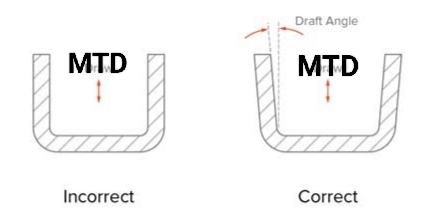
Why drafts is required on plastic parts and it's minimum values.

Drafts are essential on plastic parts to ensure they can be easily removed from the mold during the injection molding process. Here's why drafts are required and why they should have minimum values:


Reasons for Drafts:

1. Easier Mold Release:

During injection molding, the plastic part cools and shrinks slightly, which can cause it to stick to the mold surfaces. A draft angle (a slight taper) allows the part to be released without damaging the part or the mold.

2. Prevents Part Damage:

Without a draft, the part may experience scratches, warping, or deformation during ejection from the mold.

3. Reduces Ejection Force:

A draft reduces the friction between the part and the mold, requiring less force to eject the part.

4. Improves Surface Finish:

Proper drafts ensure the part comes out smoothly, avoiding drag marks or defects on the surface.

5. Extends Mold Life:

By reducing the wear and tear during ejection, drafts help extend the mold's lifespan.

---

Why Minimum Draft Values?

1. Dimensional Accuracy:

Excessive draft angles can alter the intended dimensions of the part, especially in areas where precision is critical.

2. Aesthetic Requirements:

Overly large drafts might affect the design or appearance of the part, leading to customer dissatisfaction.

3. Functional Fit:

Parts with excessive drafts might not fit well with other components in assemblies.

4. Material Properties:

Some plastics shrink more than others. A minimum draft angle should consider the material's shrinkage rate to balance ease of ejection with the part's integrity.

---

Typical Minimum Draft Angles:

General rule: 0.5° to 2° is sufficient for most plastic parts.

Texture considerations: For textured surfaces, drafts of 3° or more may be required to prevent sticking.

By designing with the correct minimum draft angle, manufacturers can ensure efficient production, maintain quality, and reduce costs.

Wednesday, 11 October 2023

The Importance of Networking in the Mechanical Engineering Industry

As a mechanical engineer, networking is a crucial part of building a successful career. Not only can it help you make valuable connections with industry professionals, but it can also provide you with access to new job opportunities, help you stay up-to-date on industry trends, and even improve your professional reputation. Here are some of the key benefits of networking in the mechanical engineering industry and how it can help you advance your career.


●       Build Professional Relationships with Other Mechanical Engineers

Attending industry events, conferences, and seminars is a great way to meet and connect with other professionals in your field. By doing so, you can establish yourself as a thought leader and make valuable connections that can help you advance your career. Additionally, these connections can lead to new opportunities, partnerships, and collaborations, helping to build your reputation as an expert in the mechanical engineering industry.


●       Stay Up-to-Date on Industry Trends and Developments

Networking can help you stay current on the latest trends and developments in the mechanical engineering industry. By connecting with other professionals, you can learn about new technologies, techniques, and research that may be relevant to your work. This can help you stay ahead of the curve and remain competitive in a rapidly changing industry. Attending conferences and workshops can also provide valuable insights into new tools and software, which can improve your work and increase your job prospects.


●       Access New Job Opportunities

Networking is a great way to access new job opportunities that may not be advertised publicly. By building relationships with industry professionals, you can learn about job openings, internships, and other career opportunities that may be a good fit for your skills and experience. Additionally, a strong professional network can help you get referred to positions, improving your chances of landing your dream job.


●       Improve Your Reputation

Networking can also help you establish yourself as a knowledgeable and respected professional in the mechanical engineering industry. By sharing your expertise and insights with others, you can build your reputation as a thought leader and gain credibility with potential employers. This can lead to increased job opportunities and higher pay, as well as increased exposure for your work.


●       Develop New Skills and Perspectives

Networking can help you develop new skills and gain new perspectives on your work. By connecting with other professionals, you can learn about new tools, techniques, and approaches to mechanical engineering that you may not have been exposed to otherwise. This can help you become a more versatile and knowledgeable engineer, increasing your job prospects and enabling you to take on more challenging projects.


In conclusion, networking is a critical part of building a successful career in the mechanical engineering industry. By building professional relationships, staying up-to-date on industry trends, accessing job opportunities, improving your reputation, and developing your skills, you can create a strong professional network that can help you achieve your professional goals. To learn more about networking opportunities in the mechanical engineering industry, visit MechCareer.com, India's first job portal dedicated to mechanical engineers and companies who recruit mechanical engineers.


Tuesday, 9 May 2023

How to Build a Strong Mechanical Engineering Portfolio

As a mechanical engineer, building a strong portfolio is essential to showcase your skills and experience to potential employers. A portfolio is a collection of your best work, highlighting your accomplishments, technical abilities, and problem-solving skills. Here are some tips on how to build a strong mechanical engineering portfolio: 


  1. Choose Your Best Work: Start by selecting a few of your best projects to include in your portfolio. Choose projects that demonstrate a range of skills, such as design, analysis, and testing. Highlight projects that showcase your technical proficiency, innovation, and problem-solving skills.


  2. Show Your Process: It's not just the end product that matters, but also the process you took to get there. Include sketches, drawings, and other documentation that shows your design process. This can help demonstrate your problem-solving skills and creativity to potential employers.

    As a mechanical engineer, building a strong portfolio is essential to showcase your skills and experience to potential employers. A portfolio is a collection of your best work, highlighting your accomplishments, technical abilities, and problem-solving skills. Here are some tips on how to build a strong mechanical engineering portfolio: (Image 1) 1.	Choose Your Best Work: Start by selecting a few of your best projects to include in your portfolio. Choose projects that demonstrate a range of skills, such as design, analysis, and testing. Highlight projects that showcase your technical proficiency, innovation, and problem-solving skills.(Image 2) 2.	Show Your Process: It's not just the end product that matters, but also the process you took to get there. Include sketches, drawings, and other documentation that shows your design process. This can help demonstrate your problem-solving skills and creativity to potential employers.(Image 3) 3.	Use Visuals: Use visuals, such as photos, diagrams, and renderings, to showcase your work. This can help make your portfolio more engaging and memorable. Use high-quality images and ensure that they are labeled with relevant information, such as project name, date, and your role.(Image 4) 4.	Highlight Your Accomplishments: Include a section that highlights your accomplishments, such as awards, patents, and publications. This can help demonstrate your expertise and credibility in the field.(Image 5) 5.	Include Relevant Skills: Make sure to include a section that lists your relevant skills, such as software proficiency (e.g., CATIA V5, SolidWorks, ANSYS), programming languages, and certifications. This can help show potential employers that you have the technical skills required for the job.(Image 6) 6.	Tailor Your Portfolio: Tailor your portfolio to the job you are applying for. Highlight projects and skills that are relevant to the position. This can help demonstrate that you have the skills and experience needed for the job.(Image 7) 7.	Keep Your Portfolio Up to Date: Keep your portfolio up to date with your latest work and accomplishments. Update it regularly to ensure that it reflects your current skills and experience.(Image 8) By following these tips, you can build a strong mechanical engineering portfolio that showcases your skills and experience to potential employers. Remember to keep it professional, easy to navigate, and visually appealing. A strong portfolio can help you stand out in a competitive job market and demonstrate your value to potential employers.


  3. Use Visuals: Use visuals, such as photos, diagrams, and renderings, to showcase your work. This can help make your portfolio more engaging and memorable. Use high-quality images and ensure that they are labeled with relevant information, such as project name, date, and your role.


  4. Highlight Your Accomplishments: Include a section that highlights your accomplishments, such as awards, patents, and publications. This can help demonstrate your expertise and credibility in the field.

    As a mechanical engineer, building a strong portfolio is essential to showcase your skills and experience to potential employers. A portfolio is a collection of your best work, highlighting your accomplishments, technical abilities, and problem-solving skills. Here are some tips on how to build a strong mechanical engineering portfolio: (Image 1) 1.	Choose Your Best Work: Start by selecting a few of your best projects to include in your portfolio. Choose projects that demonstrate a range of skills, such as design, analysis, and testing. Highlight projects that showcase your technical proficiency, innovation, and problem-solving skills.(Image 2) 2.	Show Your Process: It's not just the end product that matters, but also the process you took to get there. Include sketches, drawings, and other documentation that shows your design process. This can help demonstrate your problem-solving skills and creativity to potential employers.(Image 3) 3.	Use Visuals: Use visuals, such as photos, diagrams, and renderings, to showcase your work. This can help make your portfolio more engaging and memorable. Use high-quality images and ensure that they are labeled with relevant information, such as project name, date, and your role.(Image 4) 4.	Highlight Your Accomplishments: Include a section that highlights your accomplishments, such as awards, patents, and publications. This can help demonstrate your expertise and credibility in the field.(Image 5) 5.	Include Relevant Skills: Make sure to include a section that lists your relevant skills, such as software proficiency (e.g., CATIA V5, SolidWorks, ANSYS), programming languages, and certifications. This can help show potential employers that you have the technical skills required for the job.(Image 6) 6.	Tailor Your Portfolio: Tailor your portfolio to the job you are applying for. Highlight projects and skills that are relevant to the position. This can help demonstrate that you have the skills and experience needed for the job.(Image 7) 7.	Keep Your Portfolio Up to Date: Keep your portfolio up to date with your latest work and accomplishments. Update it regularly to ensure that it reflects your current skills and experience.(Image 8) By following these tips, you can build a strong mechanical engineering portfolio that showcases your skills and experience to potential employers. Remember to keep it professional, easy to navigate, and visually appealing. A strong portfolio can help you stand out in a competitive job market and demonstrate your value to potential employers.


  5. Include Relevant Skills: Make sure to include a section that lists your relevant skills, such as software proficiency (e.g., CATIA V5, SolidWorks, ANSYS), programming languages, and certifications. This can help show potential employers that you have the technical skills required for the job.

    As a mechanical engineer, building a strong portfolio is essential to showcase your skills and experience to potential employers. A portfolio is a collection of your best work, highlighting your accomplishments, technical abilities, and problem-solving skills. Here are some tips on how to build a strong mechanical engineering portfolio: (Image 1) 1.	Choose Your Best Work: Start by selecting a few of your best projects to include in your portfolio. Choose projects that demonstrate a range of skills, such as design, analysis, and testing. Highlight projects that showcase your technical proficiency, innovation, and problem-solving skills.(Image 2) 2.	Show Your Process: It's not just the end product that matters, but also the process you took to get there. Include sketches, drawings, and other documentation that shows your design process. This can help demonstrate your problem-solving skills and creativity to potential employers.(Image 3) 3.	Use Visuals: Use visuals, such as photos, diagrams, and renderings, to showcase your work. This can help make your portfolio more engaging and memorable. Use high-quality images and ensure that they are labeled with relevant information, such as project name, date, and your role.(Image 4) 4.	Highlight Your Accomplishments: Include a section that highlights your accomplishments, such as awards, patents, and publications. This can help demonstrate your expertise and credibility in the field.(Image 5) 5.	Include Relevant Skills: Make sure to include a section that lists your relevant skills, such as software proficiency (e.g., CATIA V5, SolidWorks, ANSYS), programming languages, and certifications. This can help show potential employers that you have the technical skills required for the job.(Image 6) 6.	Tailor Your Portfolio: Tailor your portfolio to the job you are applying for. Highlight projects and skills that are relevant to the position. This can help demonstrate that you have the skills and experience needed for the job.(Image 7) 7.	Keep Your Portfolio Up to Date: Keep your portfolio up to date with your latest work and accomplishments. Update it regularly to ensure that it reflects your current skills and experience.(Image 8) By following these tips, you can build a strong mechanical engineering portfolio that showcases your skills and experience to potential employers. Remember to keep it professional, easy to navigate, and visually appealing. A strong portfolio can help you stand out in a competitive job market and demonstrate your value to potential employers.


  6. Tailor Your Portfolio: Tailor your portfolio to the job you are applying for. Highlight projects and skills that are relevant to the position. This can help demonstrate that you have the skills and experience needed for the job.

    As a mechanical engineer, building a strong portfolio is essential to showcase your skills and experience to potential employers. A portfolio is a collection of your best work, highlighting your accomplishments, technical abilities, and problem-solving skills. Here are some tips on how to build a strong mechanical engineering portfolio: (Image 1) 1.	Choose Your Best Work: Start by selecting a few of your best projects to include in your portfolio. Choose projects that demonstrate a range of skills, such as design, analysis, and testing. Highlight projects that showcase your technical proficiency, innovation, and problem-solving skills.(Image 2) 2.	Show Your Process: It's not just the end product that matters, but also the process you took to get there. Include sketches, drawings, and other documentation that shows your design process. This can help demonstrate your problem-solving skills and creativity to potential employers.(Image 3) 3.	Use Visuals: Use visuals, such as photos, diagrams, and renderings, to showcase your work. This can help make your portfolio more engaging and memorable. Use high-quality images and ensure that they are labeled with relevant information, such as project name, date, and your role.(Image 4) 4.	Highlight Your Accomplishments: Include a section that highlights your accomplishments, such as awards, patents, and publications. This can help demonstrate your expertise and credibility in the field.(Image 5) 5.	Include Relevant Skills: Make sure to include a section that lists your relevant skills, such as software proficiency (e.g., CATIA V5, SolidWorks, ANSYS), programming languages, and certifications. This can help show potential employers that you have the technical skills required for the job.(Image 6) 6.	Tailor Your Portfolio: Tailor your portfolio to the job you are applying for. Highlight projects and skills that are relevant to the position. This can help demonstrate that you have the skills and experience needed for the job.(Image 7) 7.	Keep Your Portfolio Up to Date: Keep your portfolio up to date with your latest work and accomplishments. Update it regularly to ensure that it reflects your current skills and experience.(Image 8) By following these tips, you can build a strong mechanical engineering portfolio that showcases your skills and experience to potential employers. Remember to keep it professional, easy to navigate, and visually appealing. A strong portfolio can help you stand out in a competitive job market and demonstrate your value to potential employers.


  7. Keep Your Portfolio Up to Date: Keep your portfolio up to date with your latest work and accomplishments. Update it regularly to ensure that it reflects your current skills and experience.

    As a mechanical engineer, building a strong portfolio is essential to showcase your skills and experience to potential employers. A portfolio is a collection of your best work, highlighting your accomplishments, technical abilities, and problem-solving skills. Here are some tips on how to build a strong mechanical engineering portfolio: (Image 1) 1.	Choose Your Best Work: Start by selecting a few of your best projects to include in your portfolio. Choose projects that demonstrate a range of skills, such as design, analysis, and testing. Highlight projects that showcase your technical proficiency, innovation, and problem-solving skills.(Image 2) 2.	Show Your Process: It's not just the end product that matters, but also the process you took to get there. Include sketches, drawings, and other documentation that shows your design process. This can help demonstrate your problem-solving skills and creativity to potential employers.(Image 3) 3.	Use Visuals: Use visuals, such as photos, diagrams, and renderings, to showcase your work. This can help make your portfolio more engaging and memorable. Use high-quality images and ensure that they are labeled with relevant information, such as project name, date, and your role.(Image 4) 4.	Highlight Your Accomplishments: Include a section that highlights your accomplishments, such as awards, patents, and publications. This can help demonstrate your expertise and credibility in the field.(Image 5) 5.	Include Relevant Skills: Make sure to include a section that lists your relevant skills, such as software proficiency (e.g., CATIA V5, SolidWorks, ANSYS), programming languages, and certifications. This can help show potential employers that you have the technical skills required for the job.(Image 6) 6.	Tailor Your Portfolio: Tailor your portfolio to the job you are applying for. Highlight projects and skills that are relevant to the position. This can help demonstrate that you have the skills and experience needed for the job.(Image 7) 7.	Keep Your Portfolio Up to Date: Keep your portfolio up to date with your latest work and accomplishments. Update it regularly to ensure that it reflects your current skills and experience.(Image 8) By following these tips, you can build a strong mechanical engineering portfolio that showcases your skills and experience to potential employers. Remember to keep it professional, easy to navigate, and visually appealing. A strong portfolio can help you stand out in a competitive job market and demonstrate your value to potential employers.

By following these tips, you can build a strong mechanical engineering portfolio that showcases your skills and experience to potential employers. Remember to keep it professional, easy to navigate, and visually appealing. A strong portfolio can help you stand out in a competitive job market and demonstrate your value to potential employers.

Monday, 8 May 2023

Employers Look for Top Skills in Mechanical Engineers


As a mechanical engineer, you're well aware of the technical skills required to excel in your field. But what about the soft skills that are in demand among employers? In today's competitive job market, it's important to have a well-rounded skill set that includes both technical and interpersonal abilities. Here are some of the top skills that employers look for in mechanical engineers:

Employers Look for Top Skills in Mechanical Engineers


  1. Technical Proficiency: At the core of any mechanical engineering position is technical proficiency. This includes a deep understanding of mechanical systems and their components, as well as proficiency in software such as CATIA V5, SolidWorks, and ANSYS. Employers are looking for candidates who have a strong technical foundation and can apply their skills to solve complex problems.

    Employers Look for Top Skills in Mechanical Engineers


  2. Communication Skills: Mechanical engineers often work on interdisciplinary teams, which means they need to be able to communicate effectively with people from a variety of backgrounds. This includes the ability to explain technical concepts in a clear and concise way, as well as active listening skills. Employers are looking for candidates who can communicate effectively with colleagues, clients, and stakeholders.

    Employers Look for Top Skills in Mechanical Engineers


  3. Problem-Solving Skills: Mechanical engineers are tasked with solving complex problems, and employers are looking for candidates who have strong problem-solving skills. This includes the ability to analyze data, identify trends, and develop solutions that are both effective and efficient. Employers are looking for candidates who can think critically and creatively to solve problems.


    Employers Look for Top Skills in Mechanical Engineers


  4. Teamwork: Mechanical engineering projects often involve collaboration with other engineers, technicians, and professionals. Employers are looking for candidates who can work effectively on teams, share knowledge and expertise, and contribute to the overall success of the project. This includes the ability to build strong working relationships, work towards common goals, and adapt to changing priorities.

    Employers Look for Top Skills in Mechanical Engineers


  5. Adaptability: The mechanical engineering field is constantly evolving, and employers are looking for candidates who can adapt to new technologies, techniques, and processes. This includes the ability to learn quickly, be flexible, and embrace change. Employers are looking for candidates who are innovative and open to new ideas.

    Employers Look for Top Skills in Mechanical Engineers


By developing a strong foundation in these key skills, mechanical engineers can position themselves as strong candidates in the job market. In addition to technical proficiency, it's important to focus on developing strong communication, problem-solving, teamwork, and adaptability skills. By showcasing these abilities in your resume, cover letter, and interviews, you can demonstrate your value to potential employers and stand out from the competition.

Wednesday, 29 March 2023

Why checklist need to follow for mechanical design?

 Checklists are an essential tool for mechanical design because they help ensure that the design process is comprehensive, efficient, and accurate. Here are some reasons why checklists are important for mechanical design:

  1. Helps Ensure Design Requirements are Met: A checklist can help ensure that all the requirements for the design have been considered and incorporated into the design. This can include factors like materials, dimensions, tolerances, safety factors, and environmental conditions.

  2. Increases Efficiency: By providing a clear and concise list of tasks to be completed, a checklist can help increase the efficiency of the design process. The designer can work through the checklist methodically, reducing the risk of overlooking important details and saving time by avoiding unnecessary backtracking.

  3. Reduces Errors: By providing a systematic approach to design, a checklist can help reduce errors and oversights. This can be especially important in safety-critical applications, where errors or oversights can have serious consequences.

  4. Improves Communication: A checklist can be used to communicate design details and requirements between different team members or departments. This can help ensure that everyone is on the same page and working towards a common goal.

  5. Helps with Documentation: A completed checklist can serve as a record of the design process, providing a useful reference for future projects or for regulatory compliance.

Overall, checklists are an important tool for mechanical design as they help ensure that the design process is thorough, efficient, and accurate.

Tuesday, 28 March 2023

what is automobile? AI Reply

An automobile, also commonly known as a car, is a vehicle designed for transportation on roads. It typically has four wheels and is powered by an internal combustion engine, electric motor, or hybrid powertrain.

The earliest automobiles were developed in the late 19th century and were initially seen as a luxury item for the wealthy. However, as technology improved and the manufacturing process became more efficient, automobiles became more affordable and accessible to the general public.

Today, automobiles are an essential mode of transportation for many people around the world. They are used for personal transportation, as well as for commercial purposes such as delivery and transportation of goods. There are many different types of automobiles available, including sedans, SUVs, trucks, and sports cars, each with its unique features and capabilities.

Monday, 27 March 2023

How to learn Design softwares (CATIA/NX/SolidWorks/CREO) without coaching?

 Learning CATIA software requires a combination of practical experience and theoretical knowledge. Here are some steps you can follow to get started:

  1. Familiarize yourself with the user interface: The first step to learning Design software is to become familiar with the user interface and understand the basic elements of the software.

  2. Read the manual: The Design Software comes with a manual that provides an overview of the software and its various tools and functions. Make sure to read it carefully to get a good understanding of the software.

  3. Take online tutorials: There are many online tutorials and courses available that can help you get started with Design software. These tutorials can provide a hands-on experience with the software and help you understand the various tools and functions.

  4. Practice, practice, practice: The best way to learn Design software is to practice using it regularly. Start with simple projects and work your way up to more complex ones as you become more proficient.

  5. Join online forums: Joining online forums and discussion groups related to Design software can provide you with additional resources and support as you learn. You can ask questions and receive advice from other users who have experience with the software.

  6. Consider certification: Obtaining a CATIA/Solidworks certification can demonstrate your proficiency with the software and can also be a valuable addition to your resume.

Remember, learning Design software (CATIA/NX/SolidWorks/CREO) takes time and patience, but with practice and dedication, you can master the software and become an expert in using it.